
Embedded AI SDK
Show Chargeback Agent and chargeback statuses in a modal or a drawer. Users review, modify, or approve its responses, for example by uploading new evidence or revising response letters. Sessions authenticate by signed access tokens.
Installation
npm
npm install @findustryai/jsCDN
<script src="https://js.findustryai.com/v1/sdk.js"></script>The CDN build sets window.FindustryAI.
Configuration
Initialize the SDK once per page load.
import { FindustryAI } from "@findustryai/js";

const findustryAI = new FindustryAI({
  token: "eyJ…"
});| Option | Type | Required | Description |
|---|---|---|---|
environment |
string | No |
'test' or 'production' (default)
|
theme |
string | No |
'light', 'dark', or 'auto'
(default). 'auto' follows OS preference
|
token |
string | Yes | Time-restricted access token signed by secret key |
Display Options
Choose a display mode with the mode option.
Modal
The modal is a centered dialog over the current page, with a semi-transparent backdrop.
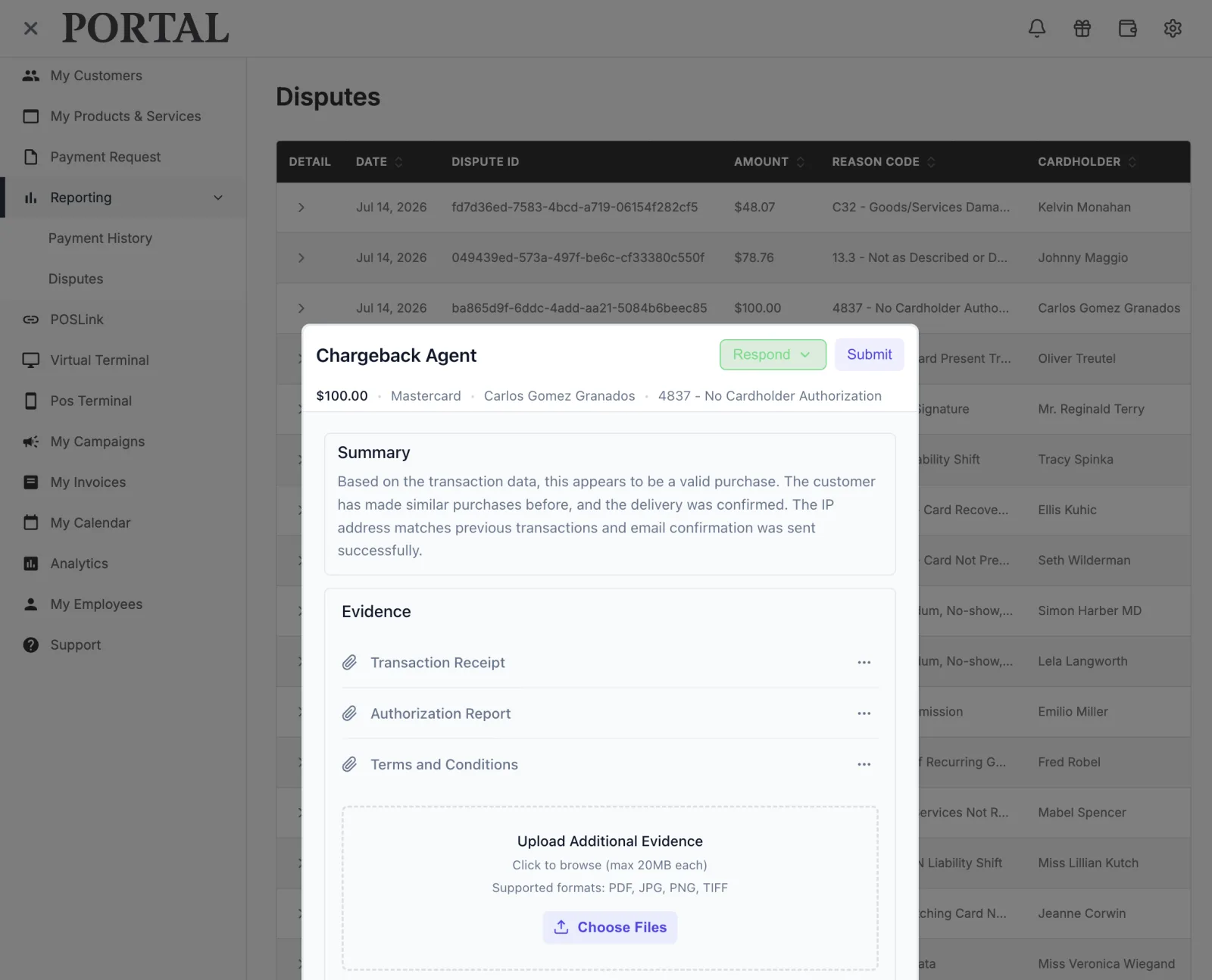
findustryAI.chargebackAgent.open({
  chargebackId: "chb_12345",
  mode: "modal",
  onResolved: (result) => {
    console.log(result.status);
    // 'won' | 'lost' | 'pending' | 'canceled'
  },
});
Drawer
The drawer opens at full height from the right edge of the viewport, beside the existing page content.
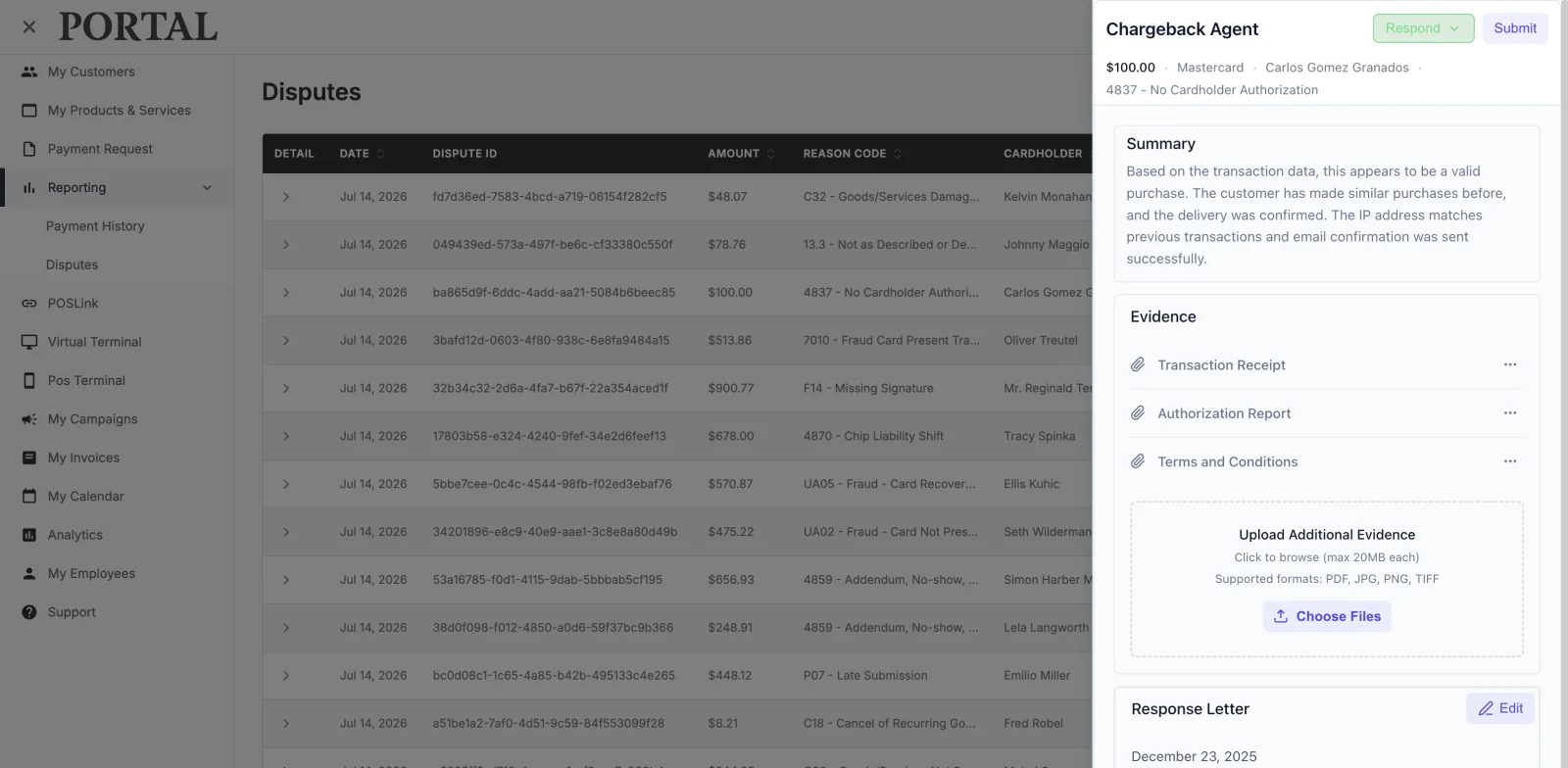
findustryAI.chargebackAgent.open({
  chargebackId: "chb_12345",
  mode: "drawer",
  onResolved: (result) => {
    // Refresh the table
  },
});
Integration Patterns
Vanilla JavaScript
const findustryAI = new FindustryAI({
  token: "eyJ…"
});

document.querySelectorAll("[data-chargeback-id]")
  .forEach((btn) => {
    btn.addEventListener("click", () => {
      findustryAI.chargebackAgent.open({
        chargebackId: btn.dataset.chargebackId,
        mode: "modal",
        onResolved: (result) => {
          // Re-fetch the dispute row
        },
        onClose: () => {
          // User dismissed without completing
        },
        onError: (error) => {
          console.error(error.code, error.message);
        },
      });
    });
  });
React Hook
import { useFindustryAI } from "@findustryai/js/react";

function DisputeList({ disputes }) {
  const { openChargebackAgent } = useFindustryAI({
    token: "eyJ…"
  });

  return (
    <ul>
      {disputes.map((dispute) => (
        <li key={dispute.id}>
          <span>{dispute.id}</span>
          <span>{dispute.amount}</span>
          <button
            onClick={() =>
              openChargebackAgent({
                chargebackId: dispute.id,
                mode: "drawer",
                onResolved: (result) => {
                  // Update status
                },
              })
            }
          >
            Manage
          </button>
        </li>
      ))}
    </ul>
  );
}
CDN (No Build Step)
<script src="https://js.findustryai.com/v1/sdk.js"></script>
<script>
  const findustryAI = new FindustryAI({
    token: "eyJ…"
  });

  function openDisputeAgent(chargebackId) {
    findustryAI.chargebackAgent.open({
      chargebackId: chargebackId,
      mode: "modal",
      onResolved: function (result) {
        alert("Chargeback " + result.status);
      },
    });
  }
</script>

<button onclick="openDisputeAgent('chb_123')">
  Manage Dispute
</button>
Embedding the Button in a Chargeback Table
Add an action button to the rightmost column of each row in the disputes
table. Pass the row's chargeback ID to chargebackAgent.open()
as chargebackId, and refresh the row in onResolved.
import { useFindustryAI } from "@findustryai/js/react";

function DisputesTable({ disputes, refetch }) {
  const { openChargebackAgent } = useFindustryAI({
    token: "eyJ…"
  });

  return (
    <table>
      <thead>
        <tr>
          <th>Dispute</th>
          <th>Amount</th>
          <th>Status</th>
          <th>Action</th>
        </tr>
      </thead>
      <tbody>
        {disputes.map((d) => (
          <tr key={d.id}>
            <td>{d.chargebackId}</td>
            <td>{d.amount}</td>
            <td>{d.status}</td>
            <td>
              <button
                onClick={() =>
                  openChargebackAgent({
                    chargebackId: d.chargebackId,
                    mode: "modal",
                    onResolved: () => refetch(),
                  })
                }
              >
                Manage
              </button>
            </td>
          </tr>
        ))}
      </tbody>
    </table>
  );
}
Chargeback Agent Methods
chargebackAgent.open(options)
Opens the agent in the configured display mode.
| Option | Type | Required | Description |
|---|---|---|---|
chargebackId |
string | Yes | Chargeback ID |
mode |
string | No | 'modal' (default) or 'drawer' |
onClose |
function | No | Called when agent is dismissed |
onError |
function | No | Called on load or processing error |
onResolved |
function | No | Called when agent completes workflow |
chargebackAgent.close()
Closes the agent, runs the close animation, and calls onClose.
chargebackAgent.isOpen()
Returns true while the agent is displayed.
Resolution Result
onResolved receives a result object:
{
  status: "won" | "lost" | "pending" | "canceled";
  chargebackId: string;
  resolution?: string;
  timestamp: string; // ISO 8601
}
Events
Subscribe to lifecycle events with on to forward them to application
event tracking.
// Agent opened
findustryAI.on("modal:open", () => { /* ... */ });

// Agent closed
findustryAI.on("modal:close", () => { /* ... */ });

// Chargeback resolved
findustryAI.on("chargeback:resolved", (result) => {
  analytics.track("chargeback_resolved", result);
});

// Any SDK error
findustryAI.on("error", (error) => {
  monitoring.captureError(error);
});
Content Security Policy
Add the SDK hosts to the page's Content-Security-Policy.
connect-src … https://js.findustryai.com https://js.test.findustryai.com;
frame-src   … https://js.findustryai.com https://js.test.findustryai.com;
script-src … https://js.findustryai.com https://js.test.findustryai.com;| Directive | Allows |
|---|---|
connect-src |
Session requests |
frame-src |
Modal and drawer |
script-src |
CDN script. Not needed with npm |
| Environment | Host |
|---|---|
| Production | https://js.findustryai.com |
| Test | https://js.test.findustryai.com, optional |
With 'strict-dynamic', add the page's nonce to the CDN
<script> tag.
TypeScript Support
The package includes TypeScript declarations.
import type {
  FindustryAI,
  FindustryAIConfig,
  ChargebackAgentOptions,
  ChargebackResult,
  ModalMode,
} from "@findustryai/js";
Lifecycle
Destroy the SDK instance when the application no longer uses the agent, for example after a single-page app route change:
findustryAI.destroy();
destroy closes any open agent, removes event listeners, and releases
DOM resources.